Connect an AI agent to your help desk with MCP
Deskwoot has a Model Context Protocol server, so you can point an AI agent at your help desk and let it actually work: reply, draft for approval, manage contacts, start outbound conversations. Here is what it does, how OpenClaw bots connect, and how to keep it safe.
Deskwoot Team
5 min read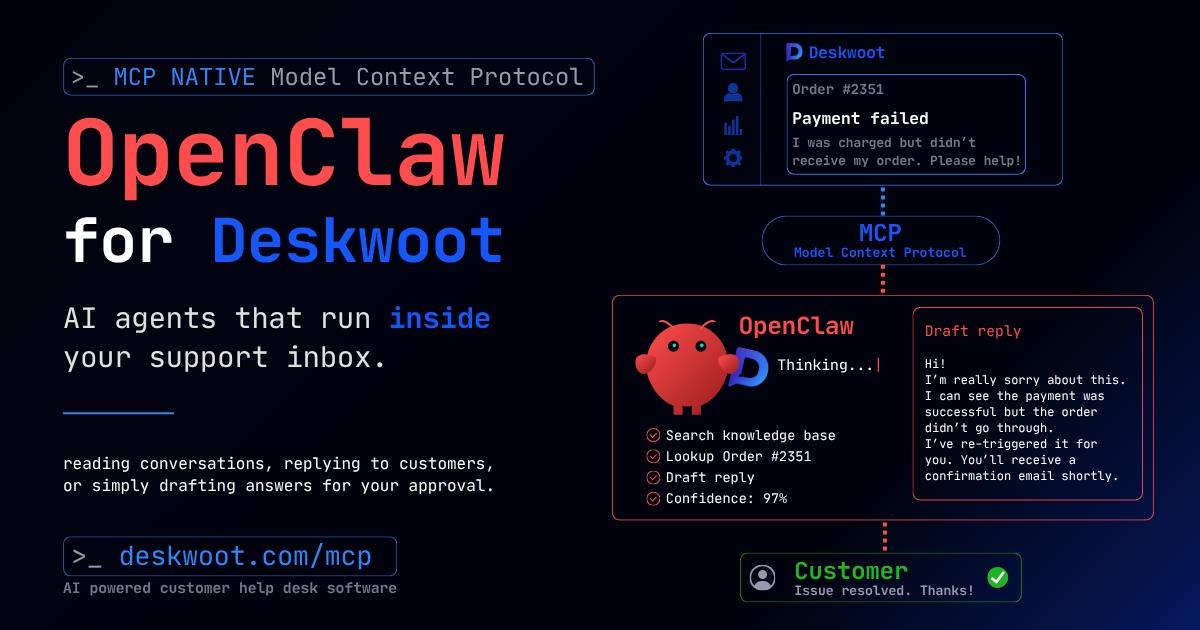
Contents
Deskwoot has a Model Context Protocol (MCP) server, which means you can point an AI agent at your help desk and let it actually work the queue: read conversations, reply to customers, leave private notes, draft answers for a human to approve, manage contacts, and start outbound conversations. If you have built an agent with OpenClaw or any other MCP-aware framework, it connects to Deskwoot through one authenticated endpoint and gets a defined set of tools, with scopes you control and an audit trail behind every action.
What is MCP, and why does it matter for support?
The Model Context Protocol is a standard way to hand an AI agent a set of tools it can call. Instead of writing a brittle one-off integration against a REST API and babysitting it, you connect an MCP client and the agent discovers exactly what it is allowed to do. For customer support that is the difference between a bot that drafts text in a vacuum and an agent that works inside your real help desk: it sees the actual conversation, replies on the right channel, and leaves a trail your team can read.
That is the part most "AI support" demos skip. Answering is easy. Operating, safely, inside the system your team already uses is the hard part, and it is the part MCP solves.
What can an AI agent do through Deskwoot's MCP server?
The agent gets a focused tool set, not a master key. It can:
- List, search, and read conversations and their full message history.
- Reply to a customer, or leave a private note only your team sees.
- Create a draft reply that stays pending until a human approves it. Nothing goes out without sign-off unless you allow it.
- Set status, priority, labels, and custom attributes, and assign or escalate a conversation to a person.
- Find, create, and update contacts, and add notes to them.
- Start a new outbound conversation, which is what makes proactive work (onboarding nudges, follow-ups, outreach) possible.
- Poll an events feed so it knows what changed since it last looked.
Just as important is what it cannot do. The MCP surface deliberately excludes account settings, billing, deleting data, mass broadcasts, and webhook management. Those stay with humans in the dashboard. An agent that gets prompt-injected by a clever customer still has nothing dangerous to reach for.
Why drafts and private notes change the game
The fastest way to lose trust in an AI agent is to let it send a confident wrong answer to a customer. So the most useful tools in the set are the quiet ones. An agent can draft a reply and leave it pending, and a human approves or edits it in one click. It can drop a private note ("customer is on the Business plan, last order shipped late") that gives the human everything they need without the customer ever seeing it. You get the speed of automation and the safety of a person in the loop, and you can dial how much autonomy you grant as your confidence grows.
How do OpenClaw bots connect?
Any MCP client works, OpenClaw included. You enable the MCP server in Deskwoot, mint a scoped bot token, and point your agent at the connection URL (your Deskwoot host followed by /api/mcp) with the token as a bearer credential. The agent calls tools/list, sees exactly the tools above, and starts working. There is no custom backend to host and no REST plumbing to maintain. If your OpenClaw bot already speaks MCP, this is a configuration step, not a build.
Is it safe to let an AI agent into your inbox?
That is the right question to ask before connecting anything. A few things make it workable:
- Every token is scoped. You choose which permissions it gets (read only, reply, manage contacts) and you can restrict it to specific inboxes.
- Tokens are revocable on the spot. Pull one and the agent loses access immediately.
- The agent acts as its own service account, so every reply, note, and status change is attributed to it in the audit log. You can always see what the bot did and when.
- It is locked to your workspace. There is no path to another company's data.
In other words, the agent is a teammate with a name badge and a leash, not an anonymous script with the keys to everything.
What can you actually build with it?
Two patterns show up most. The first is inbound support: an agent triages incoming conversations, answers the routine ones from your help center, drafts replies for the trickier ones, and escalates anything involving money or a frustrated customer to a person. The second is proactive: because the agent can start outbound conversations, it can run onboarding check-ins, follow up on stalled tickets, or handle outreach like contacting creators and partners. The same connection covers both, because the agent is operating your real help desk, not a sandbox.
How to turn it on
The MCP server is part of the Enterprise plan, and it is available during the 7-day Enterprise trial that every new account starts on, so you can wire up an agent and see it work before committing. Open Settings, then MCP Server, enable it, mint a bot token with the scopes you want, and connect your agent. The setup guide walks through each step.
AI agents are getting genuinely good at customer work. The teams that win with them will not be the ones with the cleverest model. They will be the ones who gave their agent safe, scoped access to the system where the work actually happens, and kept a human on the approvals that matter. That is what the MCP server is for.

