
Click-to-WhatsApp Ads tracking and Lead Ads automation in Deskwoot
Run paid Click-to-WhatsApp Ads or Meta Lead Ads to a WhatsApp number? Deskwoot captures the ad ID + click ID on every inbound chat (Click-to-WhatsApp attribution) and pipes form-fills into a WhatsApp conversation with a pre-approved Template Message that opens the 24h reply window (Meta Lead Ads automation). Same flat-rate plan, no respond.io middleman, AI bot Fynn answering both flows.
 Deskwoot Team·May 1, 2026·10 min read
Deskwoot now handles two parts of Click-to-WhatsApp ad spending from start to finish: tracking which Facebook or Instagram ad drove an inbound WhatsApp chat, and automatically opening a WhatsApp Template Message the moment a Meta Lead Ads form is submitted. One is figuring out which ad drove which inbound WhatsApp chat. The other is reaching out fast when a lead fills out a form on Facebook or Instagram and never opens WhatsApp themselves. Most help-desk and CRM tools do neither. Deskwoot now does both in the same WhatsApp inbox, on the same flat-rate plan.
This post walks through both flows. Pick the one that maps to how you run paid WhatsApp marketing.
What is a Click-to-WhatsApp Ad?
A Click-to-WhatsApp Ad (CTWA) is a Facebook or Instagram ad whose call-to-action button says "Send Message" and opens a WhatsApp chat with your business number when tapped. They're the dominant paid-acquisition format for WhatsApp marketing in LATAM, India, MENA, and increasingly Europe. Two reasons: tap-rate is much higher than landing-page ads, and the conversation lands directly in the customer's most-used messaging app.
The catch is reporting. Once the customer is in WhatsApp, Meta's Ads Manager has no idea what happened next. You see clicks. You don't see closes. Without ad attribution flowing back, the Conversions API stays half-blind, your bidding model can't optimise on revenue, and your ROAS reports fall back on coarse guesses.
Flow 1: Click-to-WhatsApp ad attribution (inbound)
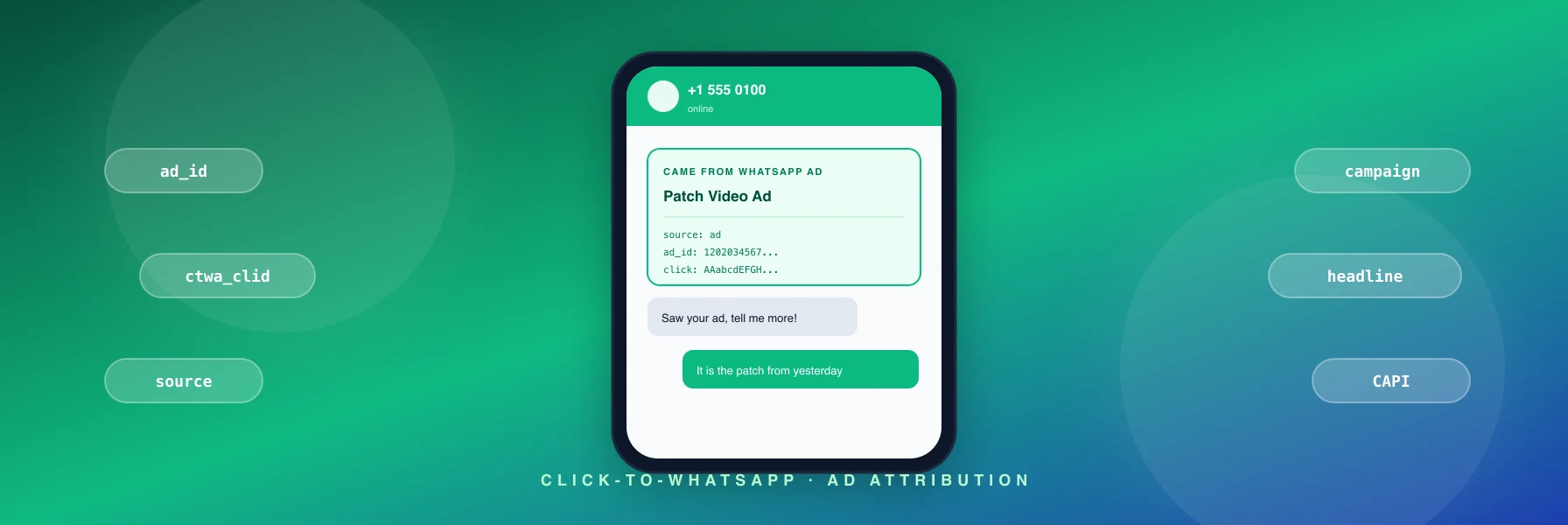
The customer clicks a Click-to-WhatsApp Ad on Facebook or Instagram, WhatsApp opens on their phone, they send the first message themselves. Meta attaches a referral object to that first inbound webhook with the ad ID, the click ID, the headline, the body, the source URL, and the creative. Most help-desks throw it away. Deskwoot captures every field.
Why WhatsApp ad attribution matters for paid acquisition
Once attribution is on, three things change at once:
- Per-ad ROAS. Group your won deals by
customAttributes.whatsappReferral.sourceId, slice by ad creative, and see which video, static, or carousel actually pays back. The currency of WhatsApp marketing is no longer guesswork. - Closed-loop bidding. Pipe the click ID (
ctwa_clid) plus the deal value back to Meta's Conversions API via webhook. Meta's algorithm starts learning from real revenue instead of just landing-page proxies. - Smarter follow-up. When the agent or AI bot opens the chat, they already know the visitor saw the "30% off limited drop" video. The first reply can be specific instead of generic.
How Click-to-WhatsApp Ads tracking works in Deskwoot
Set up your WhatsApp Cloud API inbox under Settings, Inboxes, WhatsApp. Point your Click-to-WhatsApp campaigns at the same number in Meta Ads Manager. Done. No further config. The first message of every ad-originated session arrives with Meta's referral object attached, we save it to conversation.customAttributes.whatsappReferral, and the green Came from WhatsApp ad card appears in the conversation sidebar.
The compact version is also mirrored to the contact, so a visitor who clicks an ad today and a different ad three weeks later has both touches on their record. Multi-touch attribution stays intact whether you read it from the dashboard or the API.
Flow 2: Meta Lead Ads to WhatsApp (outbound)
Different funnel. The customer fills out a Lead Ad form on Facebook or Instagram. They never open WhatsApp. They never message you. They just hand over their email and phone via the form. The respond.io setup most teams pay $79 per month for handles this by webhook-fanning to a WhatsApp template-send service. That is one more SaaS bill plus a separate dashboard your agents have to context-switch into. We thought that was an obvious thing to ship inline, so we did.
Why the WhatsApp 24-hour window matters
WhatsApp policy: outside a 24-hour service window, you cannot send free-form messages to a customer. The only outbound type Meta allows is a pre-approved Message Template. The template has variables you fill in (the lead's first name, your account name, anything from the form). Once the customer taps any button on the template or sends any reply, the 24-hour window opens and your agent can reply normally.
Timing matters. If you wait an hour to send the welcome template, the customer has moved on. If you send it the second the form-fill webhook lands, you catch the customer with their phone still in their hand. That is what Deskwoot's Meta Lead Ads connector automates.
What is different from respond.io and Wati
- Same flat rate as the rest of Deskwoot. No separate Lead Ads SKU, no $79 starter tier. If you have a Deskwoot account, you have this.
- Fynn (AI bot) answering WhatsApp directly. The same AI that handles your live chat triages WhatsApp leads automatically, with handoff to humans when needed. respond.io ships a separate add-on for that, Wati gates AI behind higher tiers.
- One inbox for everything. Lead Ads conversations land alongside email, live chat, Telegram, organic WhatsApp. Same dashboard, same shortcuts, same SLA tracking. respond.io and Wati are parallel systems you context-switch into.
- Meta Lead Ads referral data persisted. The form ID, ad ID, campaign ID, and every form-field value live on the conversation under
customAttributes.metaLeadAd. Webhooks and the REST API see them, so closed-loop reporting back into Meta's Conversions API is two lines in Zapier or n8n.
How to create Click-to-WhatsApp Ads and connect Meta Lead Ads to Deskwoot
For Click-to-WhatsApp Ads:
- Set up a WhatsApp Cloud API inbox in Deskwoot under Settings, Inboxes, WhatsApp. Five-minute walk-through inside the wizard.
- In Meta Ads Manager, create a campaign with the objective "Engagement" or "Sales" and the destination "Messaging Apps".
- Pick WhatsApp as the messaging app, point it at your Cloud-API number, design the ad creative.
- Publish. Inbound chats appear in your Deskwoot WhatsApp inbox with the green Came from WhatsApp ad attribution card.
For Meta Lead Ads to WhatsApp:
- Go to Settings, Integrations, Meta Lead Ads in Deskwoot.
- Paste your Facebook Page ID, a long-lived Page Access Token (with
leads_retrieval,pages_manage_metadata,pages_read_engagement), and your Meta App Secret. - Pick the WhatsApp Cloud API inbox to route leads into.
- Type the name and language of an approved welcome template (e.g.
lead_welcome,en_US). - Click Connect. We round-trip the token, then call Meta to subscribe the Page to leadgen webhooks.
Open the configure panel and you'll see a slug-scoped callback URL plus a per-Page verify token. Paste both into your Meta App Dashboard webhook subscription. App Secret leaks on one Page never give access to another Page's webhook because each one has its own token.
Field mapping and template variables
Click Discover fields on the configure panel. Deskwoot pulls every question key from every active Lead Ad form on the Page via Graph API, caches them, and wires them into two pickers:
- Field mapping: which Meta question becomes which Deskwoot contact field (email, name, phone, company, job title).
- Template variables: which value fills each
{{1}}, {{2}}, ...in your welcome template. Pick from lead first name, account name, static text, or any discovered form field.
The picker matters because templates with the wrong variable count fail at Meta's end. Hardcoding two variables would break every template that needs zero, one, three, or four. Customer-controlled.
Both flows together
The two answer different questions:
- Click-to-WhatsApp Ads attribution tells you which ad drove the chat that already started. Read-only capture.
- Meta Lead Ads to WhatsApp tells you nothing new about the ad, but it starts the chat for you when the customer never opens WhatsApp themselves. Outbound automation.
Both write to conversation.customAttributes, both flow through the same webhook + REST API surface. If you run both, every WhatsApp conversation in your Deskwoot inbox carries the full Meta-side context: which campaign drove it, which form fields the customer filled in (if any), which click sealed the deal.
Pulling WhatsApp ad data into your CRM
Subscribe to the conversation.created webhook under Settings, Webhooks. Every payload now carries either customAttributes.whatsappReferral (Flow 1) or customAttributes.metaLeadAd (Flow 2), or both. Two lines in Zapier or n8n is enough to drop the click ID into HubSpot, Pipedrive, Salesforce, or a Google Sheet for your media buyer. Same for the WhatsApp CRM integration: agents see the full ad context inside Deskwoot without leaving the inbox.
Enjoying this?
Get the Deskwoot newsletter
One email a month. Practical guides on AI customer support, no marketing fluff.
Frequently asked questions
What is a Click-to-WhatsApp ad?
A Click-to-WhatsApp ad (CTWA) is a paid Facebook or Instagram ad whose call-to-action opens a WhatsApp chat with your business number on tap. It is the standard format for paid WhatsApp marketing where you want conversation-first acquisition instead of landing-page-first.
How do I create a Click-to-WhatsApp ad?
In Meta Ads Manager: pick the "Engagement" or "Sales" campaign objective, choose "Messaging Apps" as the destination, pick WhatsApp, and point it at a Cloud-API number you control. Connect that same number to a Deskwoot WhatsApp inbox so inbound chats land in a shared inbox instead of one phone.
How do I track WhatsApp ads in my CRM?
Connect WhatsApp Cloud API to a help-desk that captures Meta's referral webhook payload (Deskwoot does this automatically). Pipe conversation.customAttributes.whatsappReferral through a webhook subscription into your CRM of choice. The fields include ad ID, click ID, campaign, headline, source URL.
Does Deskwoot support Meta Lead Ads to WhatsApp?
Yes, on every plan. Settings, Integrations, Meta Lead Ads. The connector subscribes your Facebook Page to the leadgen webhook, fetches form-fills via the Graph API, opens a WhatsApp conversation in your configured inbox, and sends a pre-approved Template Message to open the 24-hour reply window.
What is the WhatsApp 24-hour window?
WhatsApp Business API lets you send free-form messages only within 24 hours of the customer's last inbound message. Outside that window, you can only send pre-approved Message Templates. This is a Meta policy, not a Deskwoot one.
What is still ahead
Facebook Login OAuth in the Lead Ads connect flow (today you paste the Page Access Token by hand). Auto-refresh of long-lived tokens before the 60-day expiry. Outbound media for non-template messages. All on the roadmap.
Available now
Both flows are live for every Deskwoot account on every plan. Nothing to enable for Click-to-WhatsApp Ads attribution, just point an ad at your inbox. For Meta Lead Ads automation, set up the connector under Settings, Integrations, Meta Lead Ads. For pricing details, see the pricing page; for the full WhatsApp customer support stack, see WhatsApp on Deskwoot.
How can Click-to-WhatsApp ads grow my business?
Click-to-WhatsApp ads grow a business in 2026 through 3 mechanisms: they shortcut the discovery-to-conversation gap (the customer goes from Facebook or Instagram feed straight to a WhatsApp chat with you in 1 click); they capture intent at the moment it's strongest (the customer just saw your ad and has questions while it's fresh); and they let you continue the conversation outside the ad context (the WhatsApp number stays in their phone, so re-engagement costs nothing later).
The biggest wins typically come from product categories with consideration friction: home improvement, healthcare, real estate, B2B services, education. Categories with low-friction impulse purchase (clothing, snacks) usually do better with standard Shopify or web checkout. To track ROI, connect WhatsApp to a support platform like Deskwoot that captures Meta's ad-attribution referral data on every inbound chat and stores it on the contact.
Are WhatsApp Business ads effective for customer support?
WhatsApp Business ads are effective for customer support when used correctly: they bring inbound questions into a channel customers prefer (WhatsApp has 2+ billion monthly users globally), the conversation can continue across days without losing context, and the channel performance is measurable through the same support platform that handles your email and live chat.
The mistakes that kill effectiveness: treating WhatsApp as a one-way broadcast channel (Meta restricts that), staffing it with a single phone running the consumer WhatsApp app instead of WhatsApp Business API (you'll hit the message limit fast and lose context across agents), or not tracking ad attribution so you don't know which Click-to-WhatsApp ad drove which conversation. Deskwoot's WhatsApp integration uses the Meta Cloud API, supports unlimited agents on one number, and captures the ad-attribution payload on every inbound message.
Frequently asked questions
Quick answers on the topics covered above.
What is Click-to-WhatsApp ad attribution?
How do I track which Facebook ad drove a WhatsApp chat?
Can I run automated WhatsApp Lead Ads with Deskwoot?
What attribution data does Meta send with WhatsApp ads?
Is Click-to-WhatsApp attribution available in every help desk?
Ready to improve your customer support?
Try Deskwoot free for 7 days. Cancel anytime.
Get started for free